

Supplement Report PDF for Your Doctor or Coach
Turn everything you take into one PDF you can hand to your doctor: your daily schedule, every product with its serving, and the nutrient totals those products add up to.
It is built from the routine you already keep in the app, so it is ready whenever you need it and always reflects what you are taking today.
Handy before a checkup, a coaching call, or whenever someone asks "wait, what are you actually taking?"
What the report gives them
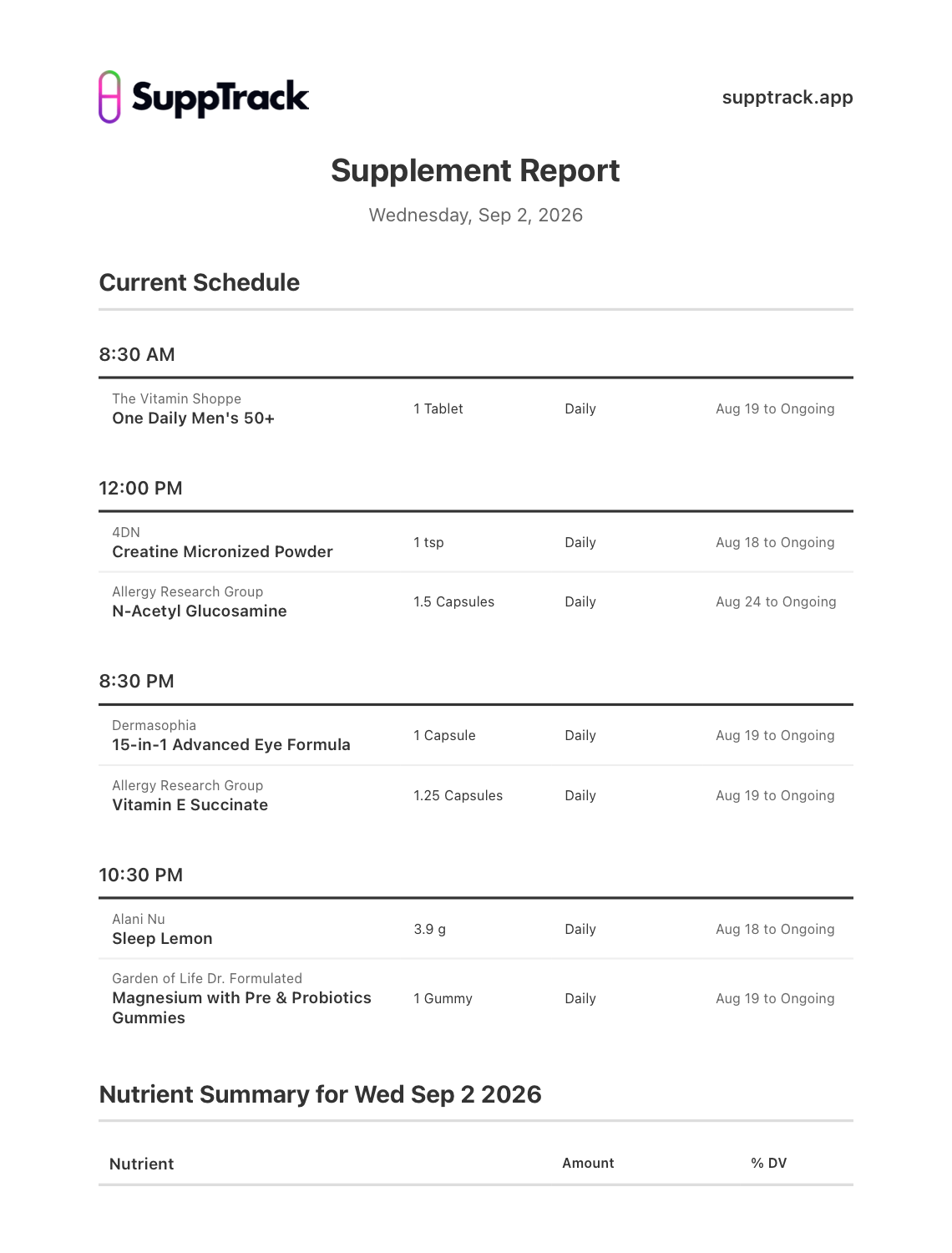
The routine, grouped by time of day
Every product under the hour it is taken, with brand, serving, how often, and the date it started.
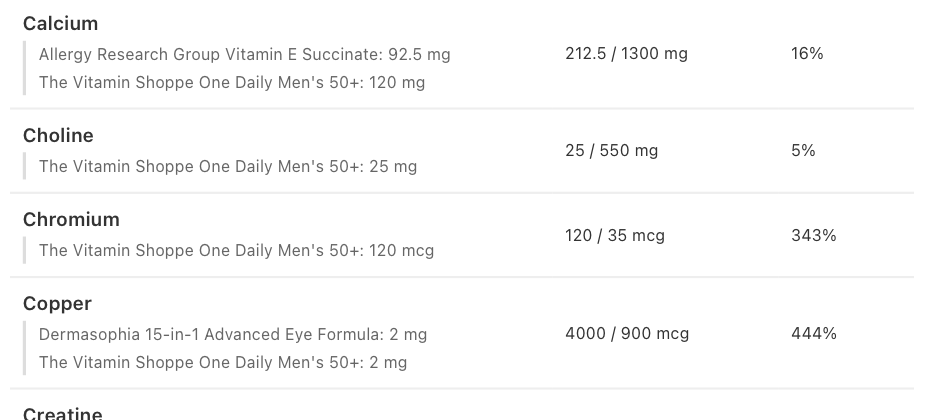
Nutrient totals with their sources
Each nutrient shows its combined amount against %DV, and which products contributed how much.
One PDF, shared any way you like
Around 60 KB. AirDrop it, email it, message it, print it, or save it to Files.
Share a cleaner routine summary
Download SuppTrack to build your routine and export it as one readable report.
Bring schedules, products, stack assignments, and ingredient totals into a single PDF instead of piecing them together manually.

Currently available in the USA only. Outside the USA? Join our mailing list for regional launch updates.
Jump to: What is in it • Where totals come from • Sharing it • FAQs
What is in the report
Two sections, generated from the routine you already keep in the app, dated the day you export it.
Your current schedule
Grouped by time of day rather than listed alphabetically, so someone reading it sees the shape of your day. Under each time sits the brand, the product, the serving you take, how often, and the date you started it. That last column answers the question you always get asked: how long have you been taking this?
A nutrient summary for that day
Every vitamin, mineral and active in your routine, with the combined amount, the Daily Value where one exists, and the percentage. Where an ingredient has no established Daily Value, the amount still shows and the percentage column stays honest with a dash.
Every total shows where it came from
This is the part that earns its place in a consultation. Under each nutrient, the report lists the products contributing to it and how much each one adds. A copper reading of 444% comes with its explanation attached: two products, 2 mg each.
Sending it on
Export from the app and the PDF opens in the normal iOS or Android share sheet, so it goes wherever you already send things: AirDrop, Messages, Mail, Gmail, straight to a printer, or saved to Files to bring along later. The file is around 60 KB, which sends anywhere without trouble.
FAQs
What does the report include?
Your current schedule grouped by time of day, with each product's brand, serving, frequency and start date, followed by a nutrient summary for that day showing combined amounts, %DV, and which products contributed to each total.
How do I send it to my doctor or coach?
Export it from the app and the PDF opens in the standard share sheet. From there you can AirDrop it, email it, send it in a message, print it, or save it to Files for later.
Can I see which product a total came from?
Yes. Each nutrient lists the products contributing to it and how much each one adds, so a total above 100% DV shows its sources on the same line rather than needing to be traced back.
What happens to ingredients with no Daily Value?
They are listed with their combined amount, and the percentage column shows a dash, so you can see at a glance which ingredients have an official reference and which do not.
Where does the report get its information?
The report is built from the routine you keep in SuppTrack, so it already knows your products, servings and schedule. You press export and the finished PDF appears.
Related features: Supplement Search App & Database • Vitamin & Mineral Tracker • Schedules & Reminders • Stack Builder
One document, ready to hand over
Install SuppTrack and turn your supplement plan into a shareable report.
Keep your routine up to date in the app, then export the whole thing as a PDF when someone needs to see it.
Currently available in the USA only. Outside the USA? Join our mailing list for regional launch updates.