

Supplement Schedules & Reminders
Use SuppTrack as a supplement schedule app to give every supplement its own time, serving and days. Each one reminds you separately, so your morning stack and your evening magnesium stay exactly where you put them.
It handles the shapes real routines take: different products at different times, some daily, some only on training days, and some that run for a few weeks and stop.
Set it up once and let the reminders do the remembering, whether that's one supplement or a full daily stack.
What a schedule gives you
A serving, a time and the days it runs
Every time carries its own instruction, so your evening magnesium and your morning multivitamin each sit where you want them.
As many times as the routine needs
Morning and night, or two capsules on weekdays and one at the weekend, without duplicating the product.
Cycles that stop on their own
A start date and an optional end date, so a block finishes without you remembering to switch it off.
Turn plans into a routine
Download SuppTrack to schedule supplements with exact times, repeat rules, and reminders.
Build a routine that matches mornings, evenings, training days, or cycles without losing track of what belongs where.


Currently available in the USA only. Outside the USA? Join our mailing list for regional launch updates.
Jump to: What a time carries • Several times per product • Routines that move • What you get sent • FAQs
Everything one time carries
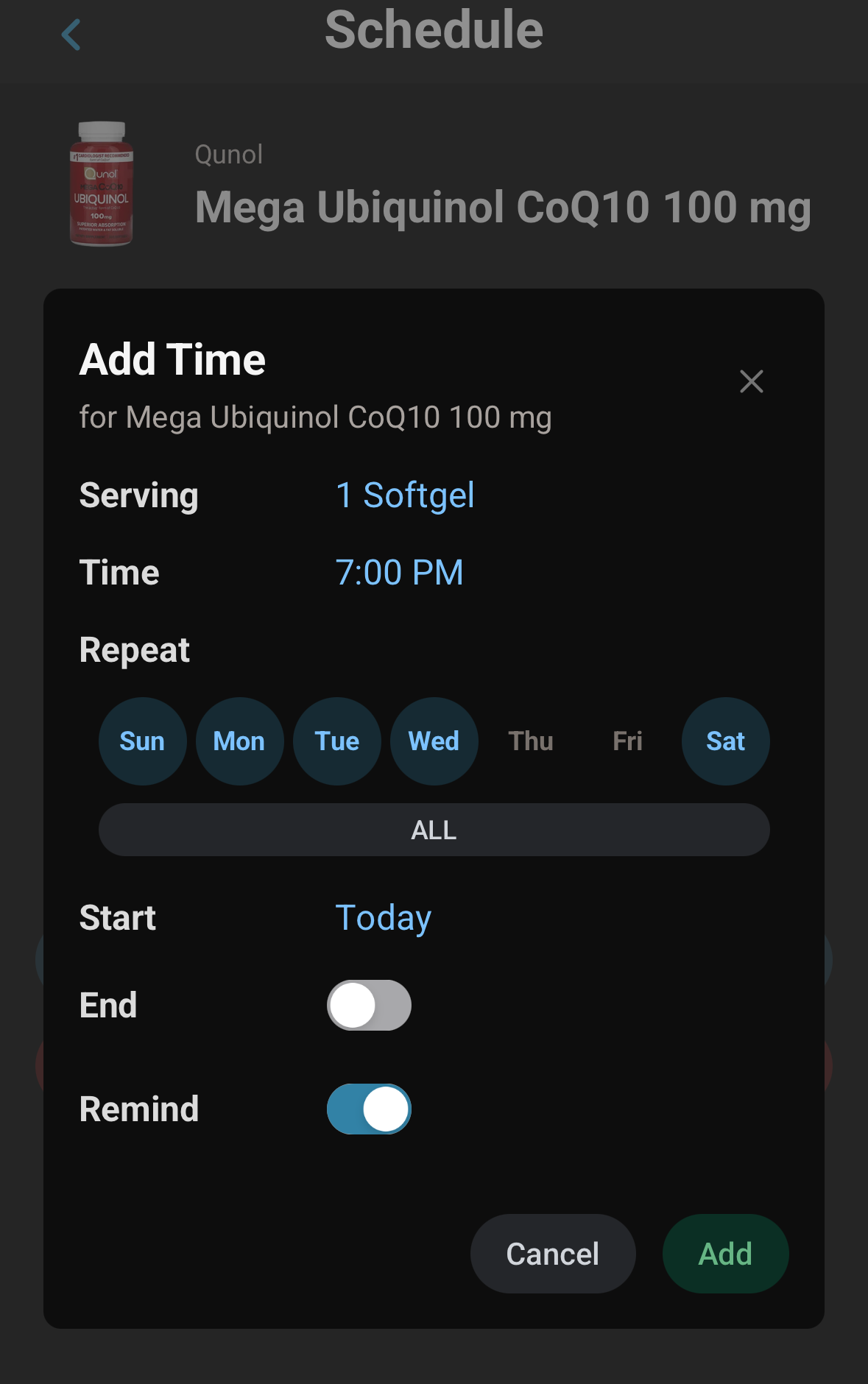
A product's schedule is built from times, and each time carries the whole instruction for that intake:
- The serving you take. Two capsules, half a scoop, one gummy. Your totals follow this rather than the serving printed on the label.
- The time of day. Set to the clock, so an evening magnesium and a morning multivitamin stay apart.
- The days it applies to. Pick specific days of the week, which is what makes weekday-only or training-day routines possible.
- A start date, and an end date if you want one. A cycled product then stops on its own the day the block finishes.
- Whether it reminds you. A toggle on each time, so you can keep something on your routine and stay quiet about it.
One product can have several times
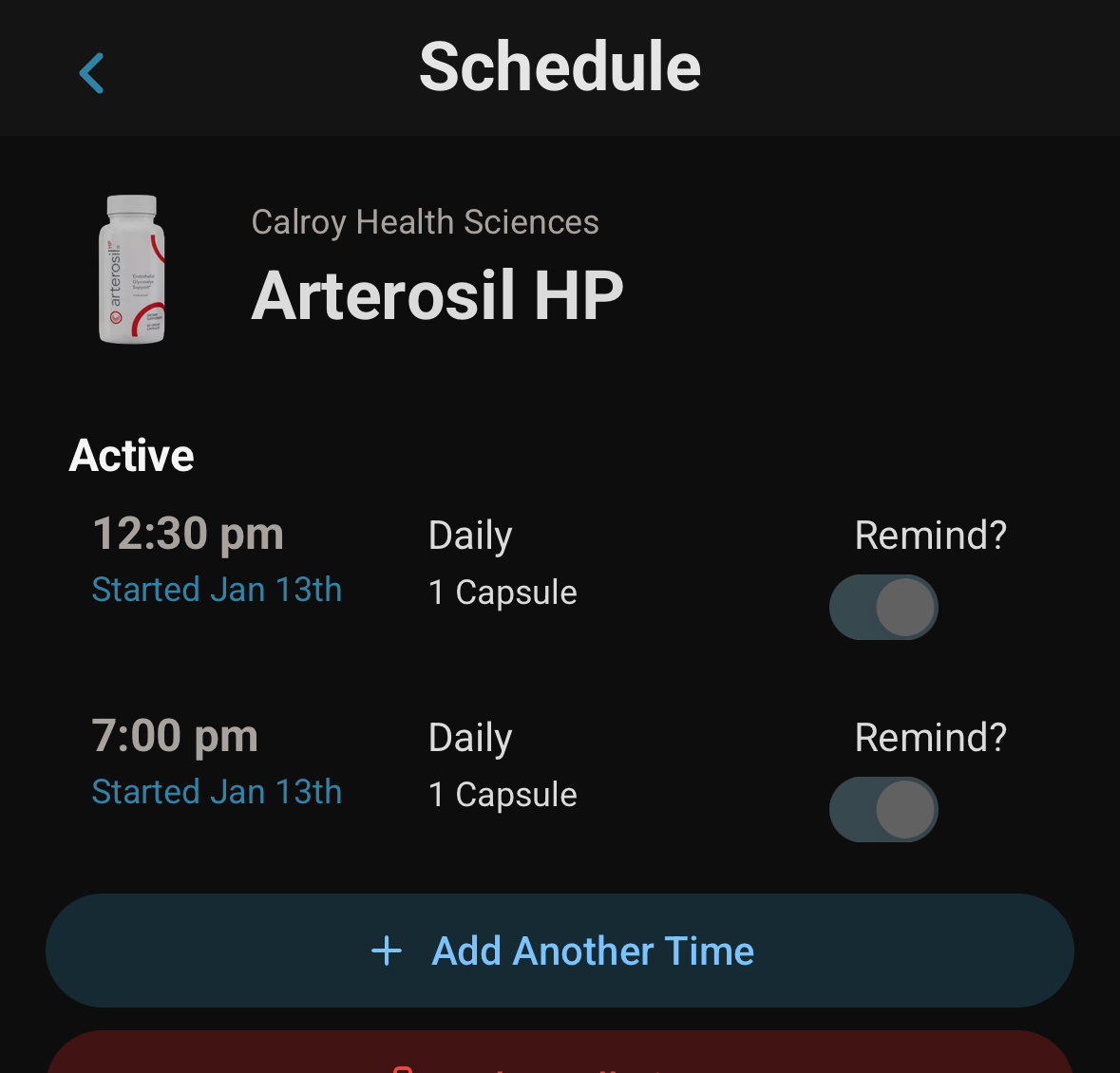
A single product carries as many times as your routine needs. A CoQ10 taken at 12:30 and again at 7pm is simply two times on one product, each with its own serving, its own days and its own reminder. Two capsules on weekdays and one at the weekend works the same way: add a second time, set it how you take it, done.
Built for routines that move around
Supplement routines move around. They shift with training days, they run in cycles, and several common ingredients are deliberately kept apart from each other. Some widely cited reasons people spread a routine across the day:
- Minerals that compete for absorption. Calcium, iron and zinc are often taken at separate times rather than together.
- Fat-soluble vitamins. A, D, E and K are absorbed better alongside a meal containing fat, which ties them to a specific eating window rather than a clock time.
- Stimulants and sleep support. Anything caffeinated usually belongs earlier in the day; magnesium and similar products often sit at the other end.
- Cycled products. Some routines run in blocks with deliberate breaks, which is what start and end dates are for.
SuppTrack is built for that shape: per-product times, day-of-week repeats, start and end dates for cycles, and reminders attached to the specific product inside a stack rather than to your routine as a whole. What to separate and when is a question for you and your clinician. This is general information, not medical advice.
What a reminder looks like
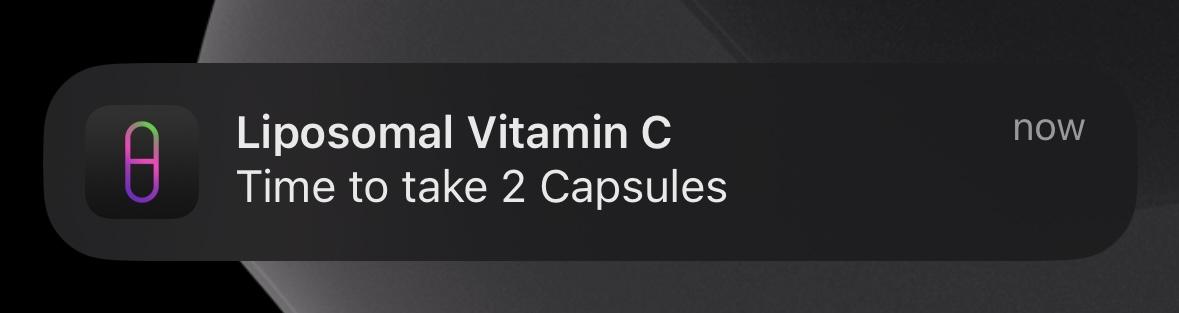
One notification per product, naming the product and the serving you set. Each one arrives at its own time, so you always know exactly what to reach for.
FAQs
Can one product have more than one scheduled time?
Yes. A product can carry as many times as you need, each with its own serving, days and reminder toggle. A CoQ10 taken at 12:30 and again at 7pm is two times on one product, not two products.
Can I take a different amount on weekends?
Yes. Every time picks its own days and its own serving, so two capsules Monday to Friday and one at the weekend is simply two times on the same product.
Can I set start and end dates for a cycled product?
Yes. Each time takes a start date and an optional end date, so a product that runs in blocks stops on its own when the block finishes instead of carrying on.
What do the reminders actually say?
One notification per product, naming the product and the serving you scheduled, such as time to take 2 capsules. You can also turn reminders off for an individual schedule while keeping it on your routine.
Do I have to act on a reminder right away?
No. A reminder is a nudge, not a checklist you have to clear. Take it when it suits you and your schedule carries on exactly as you set it.
Related features: Stack Builder • Supplement Search • Vitamin & Mineral Tracker
Set it once
Install SuppTrack and give every supplement its own schedule.
Start with one product or a full stack, then adjust schedules without rebuilding your whole routine each time it changes.
Currently available in the USA only. Outside the USA? Join our mailing list for regional launch updates.